
Basics
Concepts
The nouns Termio is built from — device, workspace, project, session, pane, and worktree — plus the status model that tells you which agent needs you.
Termio is a terminal for running several coding agents at once. Everything in the app is built from six nouns and one status model. Learn these and the rest of the docs read quickly.
Device
A device is a machine you can reach: this Mac, the Mac mini on the same desk, a VPS.
Termio reads ~/.ssh/config to find them and shells out to the system ssh to
get there — it never provisions a machine and never routes your traffic.
This Mac is a machine like any other, so the level stays invisible until you add a second one. See Devices.
Workspace
A workspace is a named scope in the sidebar, holding projects and loose terminals. Switching to one swaps what the sidebar lists, and each workspace remembers the session you left it on.
Every workspace belongs to exactly one machine, which is how the machine
question gets answered once, at the top, instead of again for every project.
⌘1 through ⌘9 switch between them. See Workspaces.
Project
A project is a folder on a machine — usually a repository. It’s the unit the sidebar groups by, and the working directory every session inside it starts in.
Opening a project doesn’t copy or index anything. Termio remembers the path and reads git for the rest.
Session
A session is one real terminal running one thing: an agent, a dev server, or a
plain shell. Each session owns a PTY — the same kind of terminal ssh or
Terminal.app gives a process — and Termio renders it with
libghostty, Ghostty’s terminal core.
Three properties matter:
- A session keeps running when you look away. Switch to another session, hide the window, or use another app; the agent keeps working. Its output is buffered and repainted when you come back.
- A session lives on its machine, not in the app. Every session — including
the ones on this Mac — runs inside
termiod, the session host, and the app is a viewer that attaches to it. Closing the window leaves the agent working, and a dropped SSH connection detaches you rather than killing anything. Only Close Session ends one on purpose. What survives is the full table. - A session is addressable. Every session has a stable URL,
termio://session/<uuid>, which is what the menu-bar tray, a notification, and thetermioCLI all use to bring one to the front.
Pane
A pane is a session’s slot on screen. One session normally fills the window, and splitting groups another session beside it — an agent on the left, a dev server and a shell on the right.
Panes are a view concern, not a second kind of session: the thing in a pane is a full session with its own sidebar row and its own status. That’s why the verbs are Group with and Ungroup rather than “split” and “close pane” — grouping changes how sessions are arranged, not what they are.
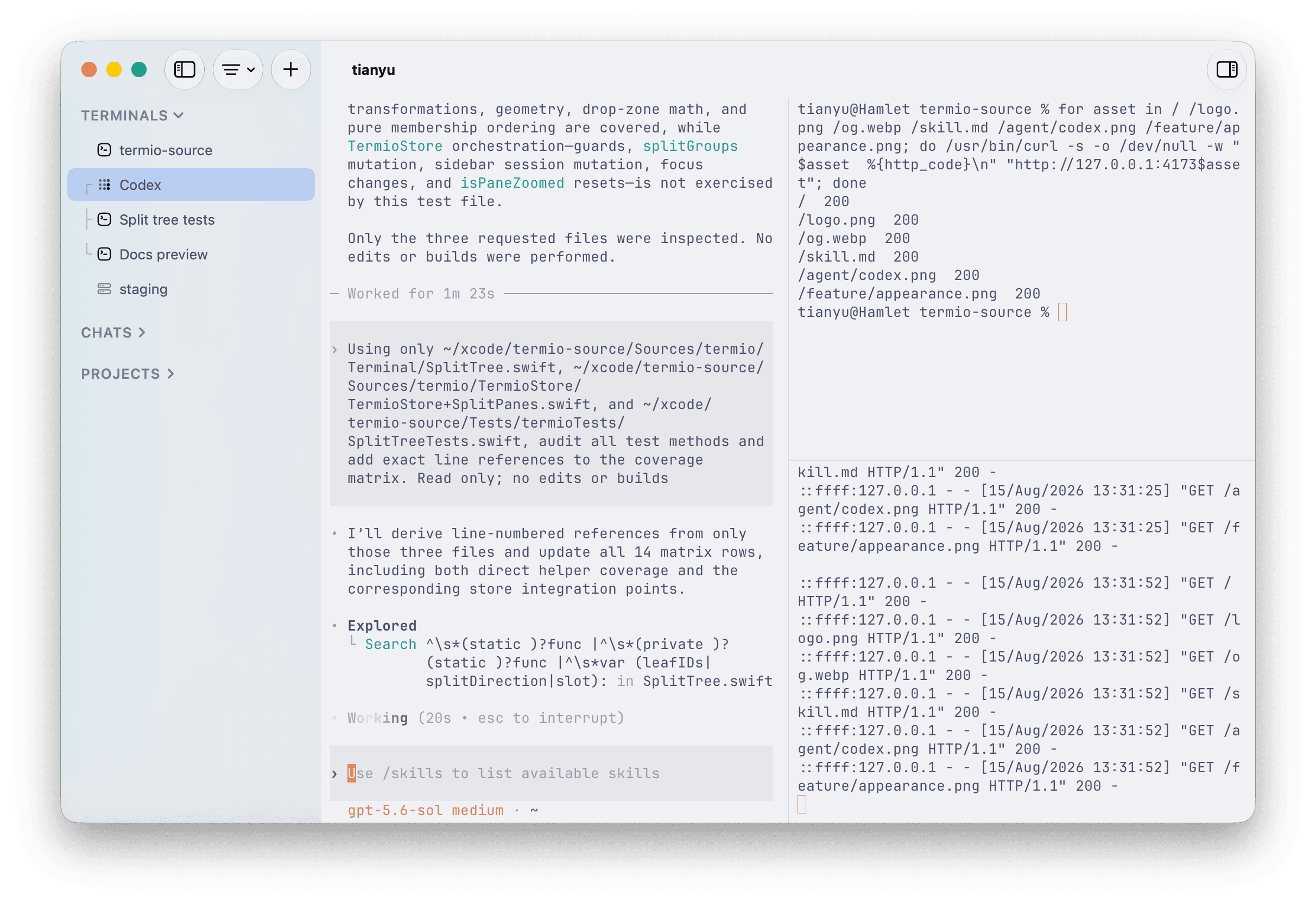
See Keyboard shortcuts for the bindings.
Worktree
A git worktree is a second checkout of the same repository on its own branch. When two agents work one repo at once, worktrees are what keep them out of each other’s files.
Termio reads them from git (git worktree list) rather than tracking its own copy,
and shows each one as a nested folder under the project. Create one in the app or
with git worktree add on the command line — either way both agree, because git
is the source of truth. See Git worktrees.
“Workspace” means the sidebar’s scope
A repository checked out on a machine is a project here, and a second checkout of it is a worktree. Workspace is reserved for the named scope in the sidebar, even though some other tools use it for the folder.
Status
Every session reports what it’s doing right now. There are four states, and the distinction between the last two is the point of the whole model:
| Status | Meaning | How it looks |
|---|---|---|
idle | Nothing pending, or you’re already looking at it. | No mark |
working | The agent is processing a turn. | The comet replaces the session’s icon |
done | The agent finished while you were elsewhere. | A green dot — ready for you |
needs-you | The agent is blocked on you: a permission prompt, a question. | An orange ring — waiting on you |
A finished turn is done, never needs-you. Conflating the two is what makes a
fleet of agents feel like a pile of alarms: if everything demands attention,
nothing does. Termio keeps “ready” calm and reserves the loud state for an agent
that genuinely cannot continue without you.
These statuses roll up: a project’s row summarizes its sessions, and the menu-bar tray summarizes everything, so you can watch a fleet from another app.
Where the signal comes from
Termio doesn’t guess from pixels where it doesn’t have to. It reads, in order of authority:
- The agent’s own hooks. On first run Termio writes its status hooks into the config of each agent that supports them, so the agent reports its own turns. Nothing for you to configure. See Session control.
- In-band terminal signals. Progress and title sequences an agent already
emits (
OSC 9;4,OSC 777) are read straight off the stream — that’s how Grok reports busy and idle without hooks. - The screen, as a last resort. For an agent with neither, Termio watches the pane for the shape of a prompt waiting on input, and promotes a status only after the reading holds.